DNS and Domain Names: How Your Browser Finds Any Website
Complete guide to DNS resolution, domain names, TLDs, and how your browser converts “aadityahasabnis.com” into the actual server IP address in milliseconds.
You just typed aadityahasabnis.com and pressed Enter. In less than a second, your browser loaded this page.
But how did your browser know which server in the world holds this website? It didn’t use the friendly name aadityahasabnis.com — it needed a numeric IP address.
That magic translator is called DNS (Domain Name System). In this article, we will break down exactly how DNS works, why it exists, and what every beginner web developer needs to know. By the end, you will understand one of the most important behind-the-scenes systems on the internet.
What is DNS and why it exists
DNS is the phonebook of the internet.
Instead of remembering long numbers like 172.217.194.78 (an IP address), we can simply type easy-to-remember names like google.com or aadityahasabnis.com.
Why DNS is necessary:
- Humans are bad at remembering numbers, but great at remembering words.
- IP addresses can change (a website might move to a new server).
- DNS makes the internet user-friendly and flexible.
Without DNS, you would have to type a long IP address every time you wanted to visit any website — which would be impossible to remember.
In simple terms: DNS converts human-friendly domain names into machine-friendly IP addresses.
The full DNS lookup process (4 steps)
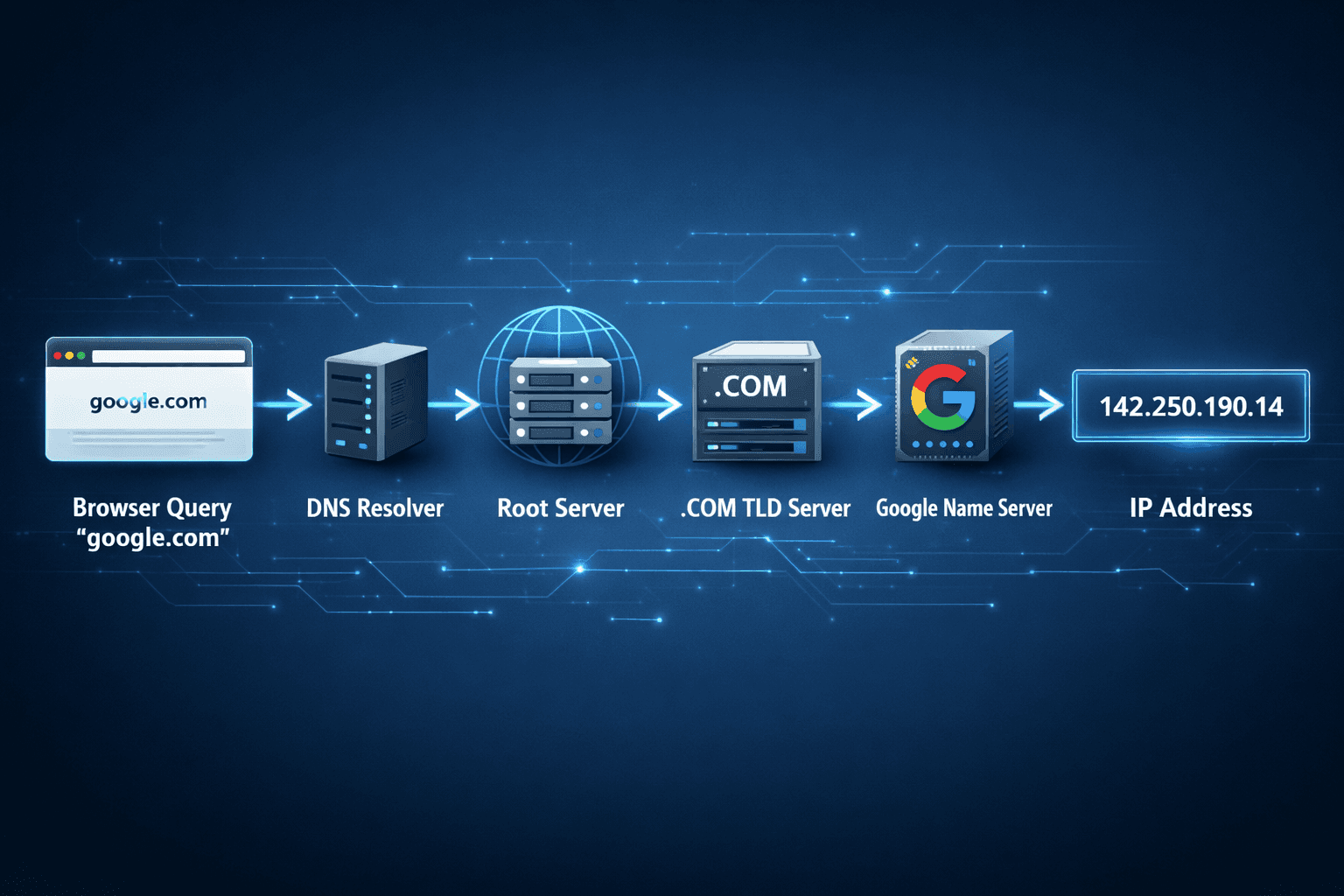
When you type a domain name, your browser performs a DNS lookup. Here is the complete step-by-step flow in plain English:
- Browser asks your device’s DNS resolver Your computer or phone first checks its own cache. If it doesn’t know the answer, it asks a DNS resolver (usually provided by your ISP or Google’s 8.8.8.8).
- Resolver asks the Root Server The resolver goes to one of the 13 special “root” servers that know everything about the internet’s structure. These root servers don’t have the exact IP, but they know who to ask next.
- Root Server points to the TLD Server The root server says: “I don’t know the exact address, but ask the .com server — it handles all .com domains.” (TLD = Top Level Domain, like .com, .in, .org)
- TLD Server points to the Authoritative Server The .com server replies: “The authoritative server for aadityahasabnis.com is at this location.” The resolver finally gets the real IP address and sends it back to your browser.
The entire process usually takes 20–200 milliseconds — so fast you never notice it happening.
Visual flow summary (this matches the image prompt above): Browser → DNS Resolver → Root Server → TLD Server → Authoritative Name Server → IP Address → Browser
Domain name parts explained (.com, .in, subdomains)
Every domain name has a clear structure. Let’s break down blog.aadityahasabnis.com:
- TLD (Top Level Domain): .com This is the ending part. It tells the internet the type or country of the website. Examples: .com, .in (India), .org, .net, .io
- Second-level domain: aadityahasabnis This is the actual name you register and pay for. It is unique to you.
- Subdomain: blog This is an optional prefix. You can create as many subdomains as you want (blog., shop., app., admin., etc.) without buying a new domain.
Real example:
- www.google.com → www is a subdomain
- aadityahasabnis.com → no subdomain (called “apex” or “root” domain)
- shop.flipkart.in → shop is a subdomain, flipkart is the second-level domain, .in is the TLD
You can register your own domain from providers like GoDaddy, Namecheap, or Cloudflare (very popular in 2026 for developers).
DNS records you should know
DNS doesn’t just store IP addresses. It stores different types of information called DNS records. Here are the most important ones for beginners:
- A Record → Points a domain to an IPv4 address (the most common one).
- AAAA Record → Points a domain to an IPv6 address (the modern version).
- CNAME Record → Points one domain to another domain name (like an alias).
- MX Record → Used for email servers (tells where to deliver emails).
- TXT Record → Used for verification (Google, Cloudflare, etc. use this).
- NS Record → Tells which name servers are authoritative for the domain.
Simple analogy: Think of DNS records as different pages in a phonebook. The A record is the “phone number” page. The MX record is the “email address” page.
Common DNS issues every developer faces
Even though DNS works automatically, you will run into these issues as a developer:
- DNS Propagation Delay When you change your DNS settings, it can take 5 minutes to 48 hours for the change to reach the whole world. This is called propagation.
- Caching Problems Your browser, ISP, or even the DNS resolver may remember old information. Solution: clear your browser cache or use Ctrl + Shift + R.
- NXDOMAIN Error Means “Non-Existent Domain” — you typed the name wrong or the domain hasn’t been registered yet.
- TTL (Time To Live) Every DNS record has a TTL value that tells how long it should be cached. Lower TTL = faster updates but more load on servers.
- Wrong Nameserver Configuration A very common mistake when pointing a domain to a new hosting provider.
Pro tip for developers: Always use Cloudflare or Google DNS (8.8.8.8) when testing. They are fast and reliable.
Quick Recap
- DNS acts as the phonebook, translating google.com into an IP address.
- The lookup process follows 4 clear steps and completes in milliseconds.
- Domain names consist of a TLD, second-level name, and optional subdomains.
- Different DNS records handle specific jobs (A, CNAME, MX, etc.).
- Common issues like propagation and caching are normal — every developer encounters them.
You now understand exactly how your browser finds any website on the internet.
Next Steps
Great job! You now know how domains are translated into server addresses.
Next article in this subtopic: Web Hosting Explained: Where Websites Actually Live in 2026
We will learn where websites actually live (shared hosting, VPS, cloud, etc.) and which one you should choose for your first projects.
Keep building your foundation — you are making excellent progress! 🚀
Comments
Thoughts, questions, and feedback.