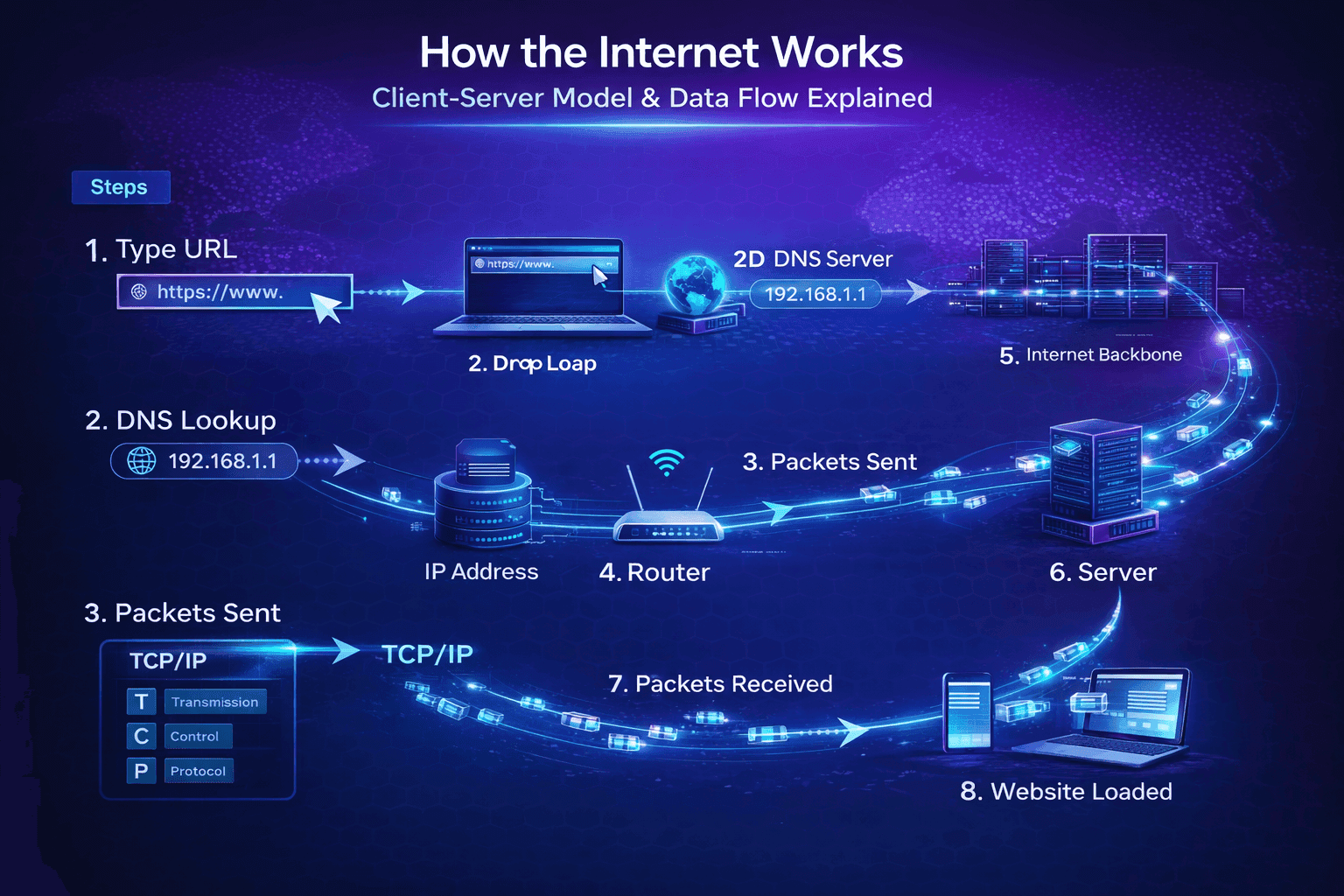
How the Internet Works: Client-Server Model & Data Flow Explained
Step-by-step breakdown of the client-server model, IP addresses, packets, TCP/IP, and how data actually travels from your device to any website in the world.
Whenever you type a URL and press Enter, something magical happens behind the scenes. In just a few seconds, your browser displays a complete webpage. But what is actually happening?
In this article, we will walk through the entire journey — step by step — using simple language. You will finally understand how your laptop or phone talks to a distant server and brings back the exact content you asked for. This is the foundation every web developer needs before writing HTML, CSS, or JavaScript.
Client vs Server – Who Does What?
The entire internet runs on a simple idea called the client-server model.
- Client = The device you are using right now (your laptop, phone, tablet, or even smartwatch). Its job is to request information. It is like a customer ordering food at a restaurant.
- Server = A powerful computer (or group of computers) somewhere in the world that stores websites, videos, databases, and files. Its job is to respond and send the requested information back. It is like the chef and waiter combined.
This relationship is two-way and happens millions of times every second.
Real-life example: When you open Instagram on your phone, your phone is the client asking, “Please send me my feed.” Instagram’s servers (located in huge data centers) are the server replying with photos, videos, and posts.
The client always starts the conversation. The server only replies when asked. This simple rule keeps the internet organized and efficient.
IP Addresses and How Devices Are Found
Every device connected to the internet needs a unique address — just like every house on a street has a unique address.
This address is called an IP address (Internet Protocol address).
- IPv4 (the older version): Looks like 192.168.1.1 or 172.217.194.78 (four numbers separated by dots).
- IPv6 (the modern version used more in 2026): Looks much longer, like 2001:0db8:85a3:0000:0000:8a2e:0370:7334.
Your internet provider gives your router an IP address. Your router then gives each device in your home its own local address.
How does your browser find the right server? It doesn’t know the server’s IP yet — that’s why it first asks a DNS server (more on that in the next article). Once it has the IP, your device can “call” the exact server it needs.
Without IP addresses, the internet would be like sending a letter without writing the address — it would never reach the right place.
What Are Packets and Why They Matter
Data on the internet is never sent as one big file. It is broken into small pieces called packets.
Think of a packet like a small envelope:
- It contains a part of your data (a few kilobytes of HTML, an image, or text).
- It has a header with important information: sender’s IP, receiver’s IP, packet number, and instructions.
Why break data into packets?
- Smaller pieces travel faster and more reliably.
- If one packet is lost or delayed, only that small piece needs to be resent — not the entire file.
- Packets can take different routes to reach the destination (this makes the internet very resilient).
Analogy: Imagine you want to send a 100-page book to a friend. Instead of mailing the whole heavy book, you tear it into 20 small chapters, put each in its own envelope, and mail them separately. Even if two envelopes take a longer route, your friend can still read the book once all chapters arrive and are reassembled in the correct order.
This packet system is what makes the internet fast, reliable, and able to handle millions of users at the same time.
TCP/IP – The Language of the Internet
For packets to reach the right place and be put back together correctly, devices need to follow strict rules. Those rules are called TCP/IP.
- IP (Internet Protocol): Handles addressing and routing. It makes sure each packet has the correct “to” and “from” address.
- TCP (Transmission Control Protocol): Handles reliability. It does three important jobs:
- Breaks data into packets.
- Makes sure all packets arrive in the correct order.
- Asks for missing packets to be resent.
Together, TCP/IP is the universal language that every device on the internet understands — from your phone in Maharashtra to a server in the USA.
Fun fact: TCP/IP was created in the 1970s and is still the foundation of the entire modern internet in 2026. It just keeps getting faster and more efficient.
Real Example: What Happens When You Visit aadityahasabnis.com
Let’s put everything together with a real example — visiting this very website.
- You type
aadityahasabnis.comin your browser and press Enter. - Your browser (client) asks, “Where is the server for this domain?”
- It gets the server’s IP address.
- Your computer creates a connection using TCP/IP (the “hello” handshake).
- Your browser sends many small packets asking for the webpage files (HTML, CSS, JavaScript, images).
- The server receives the packets, processes your request, and sends back its own packets containing the website data.
- Your browser receives all the packets, puts them back together in the correct order using TCP, and renders the complete page you see right now.
The entire process usually takes less than 2 seconds — even though the data may have travelled thousands of kilometers through routers, undersea cables, and data centers.
Quick Recap You now understand the complete flow:
- Your device (client) asks a server for data.
- IP addresses help find the exact server.
- Data travels as small packets.
- TCP/IP makes sure everything arrives correctly and in order.
This client-server model with packets and TCP/IP is how every website, app, and online service works.
Next Steps
You now have a clear picture of how the internet moves data.
Next article in this subtopic: DNS and Domain Names: How Your Browser Finds Any Website
We will see exactly how your browser turns the friendly name aadityahasabnis.com into the correct IP address in milliseconds.
Keep going — you are building a rock-solid foundation!
See you in the next article. 🚀
Comments
Thoughts, questions, and feedback.